Do you want off those obnoxious list for Porn sites? Well, it's tough. There's not really a good answer to that one. I don't think anyone has a sure fire way to keep them from sending that junk to you once they get your address. Here's the long and short of it.
These are some things you can do to minimize it.
1. Never, ever, reply or respond in any way - just delete the e-mail. When you ask to be removed, all it does is tell them they have a "real" e-mail address. After all, anyone who would send out junk like that probably doesn't really care if you're angry about being on the list. So, don't respond to junk mail. Just delete it.
Besides, most of them use a fake e-mail address, so you can't reply to it anyhow.
2. Be careful what you sign up for and tell your friends not to sign you up for stuff.
You don't want to accidentally sign up or get on a list that freely sells its subscribers to anyone who will buy (no, we don't - in case you're wondering) and they didn't inform you of this.
Unfortunately it works the same way online as it does in the real world of direct marketing. You purchase something and give your phone number away. The place you make your purchase from then sells your information and suddenly you start getting telemarketers calling constantly (especially at dinner).
So, maybe you signed up for or purchased something on the web and the company sold your e-mail address. Now your address is on a CD with millions of others that's being sold for $150.00 to whoever wants to buy it. (And no, we don't do that either)
My advice on this one is to make sure whoever you're giving your info to will respect your privacy and not sell your information to a third party. If you're one of the thousands of people who have purchased software from us in the past, you probably noticed that we have privacy policy that promises we won't give your info away. Make sure any site you give you info to has a similar policy.
3. Another way to get your e-mail address on these lists is to post stuff somewhere. You post a classified ad or stick a link on a free for all links page and your address is sitting out there for the taking. There are little programs that "harvest" e-mail address from all over the net, so any time you post something, you risk getting added to a list somewhere.
Chat rooms, especially on AOL, are good targets for these e-mail harvesters too.
Sometimes it's a good idea to maintain a free e-mail address for this kind of thing, so you can avoid getting lots of spam in your regular e-mail account. Check out Yahoo or Hotmail for these.
4. And finally - tell people to use BCC (Blind Carbon Copy) to forward you e-mail. Have you ever gotten something forwarded to you with hundreds of e-mail addresses in the header? If so, your e-mail address may be getting unintentionally passed all over the net. Tell people to BCC forwarded messages to you so your address isn't exposed to the world.
Showing posts with label Internet Tips. Show all posts
Showing posts with label Internet Tips. Show all posts
Saturday, September 1, 2007

Reclaim and Rename Your Internet Explorer
If you’ve ever used AOL or bought a computer from Compaq, you’ve already seen how the title bar in Internet Explorer can be changed. We ran an article a while back about how to remove such corporate customization, but did you know that YOU can actually change the default title yourself to whatever you want it to be?
Yes, it’s true! See, I changed mine to my favorite slogan – “Do good, joy follows.”
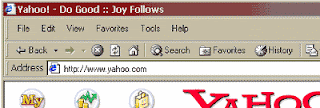
Changing the title is a simple process that only requires you to change one ‘key’ in your registry.
The standard disclaimers apply: don’t ever add random keys to your registry or delete keys unless you really, really know what you’re doing.
Let’s get to it!
Run the Registry Editor by opening the Start menu and selecting Run. Type “regedit” and click OK.
Hit F3 to bring up the search menu and type “window title.” That should take you to the following key:
KEY_CURRENT_USER\Software\Microsoft\Internet Explorer\Main
If the search doesn’t find anything, navigate to the above key by clicking in the left-hand side of the Registry Editor.
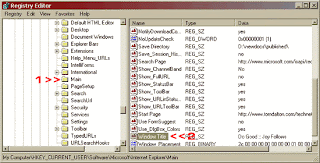
If the key exists, simply double click on the words Window Title. In the window that pops-up, edit the Value Data to whatever you want your default title to be.
If there is no Window Title, you’ll need to create it. In the Edit menu, select New and String Value. Change the Name to “Window Title” and then set the Value Data.
Close and restart Internet Explorer, and there you go!
Now you can use your newfound power to place subliminal suggestions on your boss’ computer. “Let everyone go home early!” (Say ‘everyone’ instead of using your own name, so your boss won’t know who did it!)
But always remember that with great power comes great responsibility. Have fun!
Yes, it’s true! See, I changed mine to my favorite slogan – “Do good, joy follows.”

Changing the title is a simple process that only requires you to change one ‘key’ in your registry.
The standard disclaimers apply: don’t ever add random keys to your registry or delete keys unless you really, really know what you’re doing.
Let’s get to it!
Run the Registry Editor by opening the Start menu and selecting Run. Type “regedit” and click OK.
Hit F3 to bring up the search menu and type “window title.” That should take you to the following key:
KEY_CURRENT_USER\Software\Microsoft\Internet Explorer\Main
If the search doesn’t find anything, navigate to the above key by clicking in the left-hand side of the Registry Editor.

If the key exists, simply double click on the words Window Title. In the window that pops-up, edit the Value Data to whatever you want your default title to be.
If there is no Window Title, you’ll need to create it. In the Edit menu, select New and String Value. Change the Name to “Window Title” and then set the Value Data.
Close and restart Internet Explorer, and there you go!
Now you can use your newfound power to place subliminal suggestions on your boss’ computer. “Let everyone go home early!” (Say ‘everyone’ instead of using your own name, so your boss won’t know who did it!)
But always remember that with great power comes great responsibility. Have fun!
E-mail Address Trick
I stumbled upon this one the other day and just had to share it with you.
Someone had requested to be added to the newsletter, so I copied their e-mail address and had full intentions of pasting it into the subscription form.
Well, I must have been distracted at the time because I accidentally pasted the address into my web browser address box and hit Enter.
Before I could mutter a profanity, up came the web site for his e-mail domain!
Here, try it with my address:
steve@worldstart.com
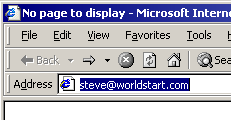
Don't click the address, copy and paste it into your web browser then hit Enter.It will turn into this:
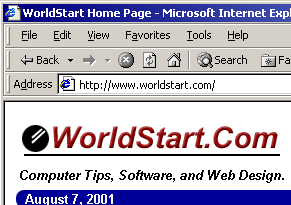
Cool huh?
So, if you ever feel the need to find out where someone is coming from, especially if it's a "SPAM" type e-mail, just copy and paste the e-mail address into your web browser and hit enter.
This is also good if you want to see someone's web site but only have their e-mail address (presuming that they own their own domain).
Finally, this little trick doesn't always work. So, no tears if you try it with a different address and it flops, OK?
Someone had requested to be added to the newsletter, so I copied their e-mail address and had full intentions of pasting it into the subscription form.
Well, I must have been distracted at the time because I accidentally pasted the address into my web browser address box and hit Enter.
Before I could mutter a profanity, up came the web site for his e-mail domain!
Here, try it with my address:
steve@worldstart.com

Don't click the address, copy and paste it into your web browser then hit Enter.It will turn into this:

Cool huh?
So, if you ever feel the need to find out where someone is coming from, especially if it's a "SPAM" type e-mail, just copy and paste the e-mail address into your web browser and hit enter.
This is also good if you want to see someone's web site but only have their e-mail address (presuming that they own their own domain).
Finally, this little trick doesn't always work. So, no tears if you try it with a different address and it flops, OK?
Internet Information Safety
Giving out your personal information to sites on the net is a touchy subject. My suggestion would be to only give out info to sites that you trust. If you don't trust a particular site, don't give out your info. I'm not too worried about giving out my info to most business sites, but I'm not going to give it to someone who just would like to have it in order to see where their visitors are coming from.
Note that most good, reputable sites will have some sort of privacy policy that tells you exactly how the information you give them will be used. If you're at all unsure, it may be worth reading the privacy policy for the site in question. If you can't find one, any paranoia you have regarding that site is probably justified.
Most sites that ask for your personal information are doing so because you're signing up for something or making some type of purchase. After all, how can you buy something online if you won't give out your address and credit card info? When this is the case, I carefully look through the site to make sure it looks OK (I check for stuff like contact info, addresses, etc.) before I give out my any of my information.
If a site is asking for a credit card number, they will only get it if I'm actually making a purchase. If it's for any other reason, forget it. If they are trying to get my social security number, they don't have a chance unless I see good reason for them to have it (applying for a loan, joining an affiliate program, etc.)
Oh, one more thing since we mentioned credit cards. I get a lot of people who are worried about sending their credit card info to a company via the internet. As long as the site is secure (you should see a little "lock" in the Status Bar of your browser - lower left hand corner), you should be safe.
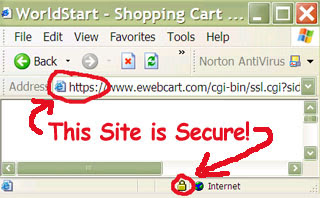
Of course, you have to trust the company you're dealing with. If you give your card to a site that's shady (porn, illegal items, etc), then you shouldn't be too surprised if you run into problems.
On the other hand, if you're dealing with a good, legit site, then you shouldn't have any problems. However, remember, not all companies are the same - before you give any site your credit card info, be sure they have stuff like contact information, a privacy policy, and you may want to check their return policy, too (assuming it applies). Doesn't hurt to do a little homework.
For the most part, it seems like credit card theft on the internet is more likely the result of having a dishonest employee (and that's not just an internet problem), than the transmission getting intercepted. It just kills me when I see people who won't use their card online, but they don't hesitate to pass it to any scummy looking store clerk, never giving it a second thought. In my opinion, you're usually as safe, if not more so, online.
I guess the best advice is to be careful. If you don't have a good reason to give out your info, then don't. If you don't feel comfortable with a site or don't completely understand why they need your info, then don't give it out.
A good resource for more information is the Identity Theft Protector software.
Note that most good, reputable sites will have some sort of privacy policy that tells you exactly how the information you give them will be used. If you're at all unsure, it may be worth reading the privacy policy for the site in question. If you can't find one, any paranoia you have regarding that site is probably justified.
Most sites that ask for your personal information are doing so because you're signing up for something or making some type of purchase. After all, how can you buy something online if you won't give out your address and credit card info? When this is the case, I carefully look through the site to make sure it looks OK (I check for stuff like contact info, addresses, etc.) before I give out my any of my information.
If a site is asking for a credit card number, they will only get it if I'm actually making a purchase. If it's for any other reason, forget it. If they are trying to get my social security number, they don't have a chance unless I see good reason for them to have it (applying for a loan, joining an affiliate program, etc.)
Oh, one more thing since we mentioned credit cards. I get a lot of people who are worried about sending their credit card info to a company via the internet. As long as the site is secure (you should see a little "lock" in the Status Bar of your browser - lower left hand corner), you should be safe.

Of course, you have to trust the company you're dealing with. If you give your card to a site that's shady (porn, illegal items, etc), then you shouldn't be too surprised if you run into problems.
On the other hand, if you're dealing with a good, legit site, then you shouldn't have any problems. However, remember, not all companies are the same - before you give any site your credit card info, be sure they have stuff like contact information, a privacy policy, and you may want to check their return policy, too (assuming it applies). Doesn't hurt to do a little homework.
For the most part, it seems like credit card theft on the internet is more likely the result of having a dishonest employee (and that's not just an internet problem), than the transmission getting intercepted. It just kills me when I see people who won't use their card online, but they don't hesitate to pass it to any scummy looking store clerk, never giving it a second thought. In my opinion, you're usually as safe, if not more so, online.
I guess the best advice is to be careful. If you don't have a good reason to give out your info, then don't. If you don't feel comfortable with a site or don't completely understand why they need your info, then don't give it out.
A good resource for more information is the Identity Theft Protector software.
Creating and handling a form with multiple submit buttons with images
Wondering how to create an HTML form with more than a single submit button with images and check which of those buttons was clicked?
First, let's take a look at the HTML code required to make a form with multiple "submit" image buttons. Note how each of the "image" type input buttons have unique names. We will be using these names to find out which of the buttons was pressed. The SRC attribute should point to unique image files, although technically you could use the same image file for all three of those input buttons. We're assuming that the script we're calling to handle the form submission (or the ACTION attribute) is "mulibtn.asp" which we will demonstrate next.
Listing #1 : HTML code. Download mulibtn.htm (0.3 KB).
Following is a sample Active Server Pages (ASP) script that you can use in conjunction with the above form. When an image button is clicked, the script will receive the position of the mouse pointer as X, Y coordinates relative to the clicked image. For example, the coordinates of the button "bsubmit1" will be sent to the script as "bsubmit1.x" and "bsubmit1.y" If a button other than "bsubmit1" was clicked, the coordinates for "bsubmit1" will contain an empty value (Nil, Empty, NULL or "" value depending on the scripting language you're using). In our ASP sample which is using VBScript, we'll check for the "nil" value.
<%
btnID = "?"
if Request.Form("bsubmit1.x") <> nil then
btnID = "1"
elseif Request.Form("bsubmit2.x") <> nil then
btnID = "2"
elseif Request.Form("bsubmit3.x") <> nil then
btnID = "3"
end if
%>
Submit button ID: <%=btnID%>
Listing #2 : ASP/VBScript code. Download mulibtn0.asp (0.29 KB).
Finally we'll combine the HTML code and the ASP script code into a single file as follows:
<%
btnID = "?"
if Request.Form("bsubmit1.x") <> nil then
btnID = "1"
elseif Request.Form("bsubmit2.x") <> nil then
btnID = "2"
elseif Request.Form("bsubmit3.x") <> nil then
btnID = "3"
end if
%>
Submit button ID: <%=btnID%>
Listing #3 : ASP/VBScript code. Download mulibtn.asp (0.39 KB).
By Chami.com
First, let's take a look at the HTML code required to make a form with multiple "submit" image buttons. Note how each of the "image" type input buttons have unique names. We will be using these names to find out which of the buttons was pressed. The SRC attribute should point to unique image files, although technically you could use the same image file for all three of those input buttons. We're assuming that the script we're calling to handle the form submission (or the ACTION attribute) is "mulibtn.asp" which we will demonstrate next.
Listing #1 : HTML code. Download mulibtn.htm (0.3 KB).
Following is a sample Active Server Pages (ASP) script that you can use in conjunction with the above form. When an image button is clicked, the script will receive the position of the mouse pointer as X, Y coordinates relative to the clicked image. For example, the coordinates of the button "bsubmit1" will be sent to the script as "bsubmit1.x" and "bsubmit1.y" If a button other than "bsubmit1" was clicked, the coordinates for "bsubmit1" will contain an empty value (Nil, Empty, NULL or "" value depending on the scripting language you're using). In our ASP sample which is using VBScript, we'll check for the "nil" value.
<%
btnID = "?"
if Request.Form("bsubmit1.x") <> nil then
btnID = "1"
elseif Request.Form("bsubmit2.x") <> nil then
btnID = "2"
elseif Request.Form("bsubmit3.x") <> nil then
btnID = "3"
end if
%>
Submit button ID: <%=btnID%>
Listing #2 : ASP/VBScript code. Download mulibtn0.asp (0.29 KB).
Finally we'll combine the HTML code and the ASP script code into a single file as follows:
<%
btnID = "?"
if Request.Form("bsubmit1.x") <> nil then
btnID = "1"
elseif Request.Form("bsubmit2.x") <> nil then
btnID = "2"
elseif Request.Form("bsubmit3.x") <> nil then
btnID = "3"
end if
%>
Submit button ID: <%=btnID%>
Listing #3 : ASP/VBScript code. Download mulibtn.asp (0.39 KB).
By Chami.com
Subscribe to:
Posts (Atom)
